Ready

Public Safety Field Training Software

PowerReady helps law enforcement, corrections, fire, and emergency communications agencies track trainee progress, digital Daily Observation Reports, and document field readiness on one platform.

What is PowerReady?

PowerReady is public safety field training software built for law enforcement, corrections, fire, and emergency communications agencies. The cloud based platform helps agencies create custom training programs, complete digital Daily Observation Reports, connect CAD call data, manage Performance Improvement Plans, and document trainee readiness with consistent, defensible records.

See how it works

Click the buttons below to take a tour of how Ready works for your Trainers, Admin, and Supervisors.

Trusted by Public Safety Agencies

Built for First Responder Training

Helps training teams guide recruits and probationary employees from academy completion through field training milestones.


PowerDMS Platform

Connected and built for a broader public safety ecosystem used by more than 6000+ agencies nationwide.

Designed for Secure Implementation

Supports controlled configuration, role-based access, and secure review workflows for sensitive training records.

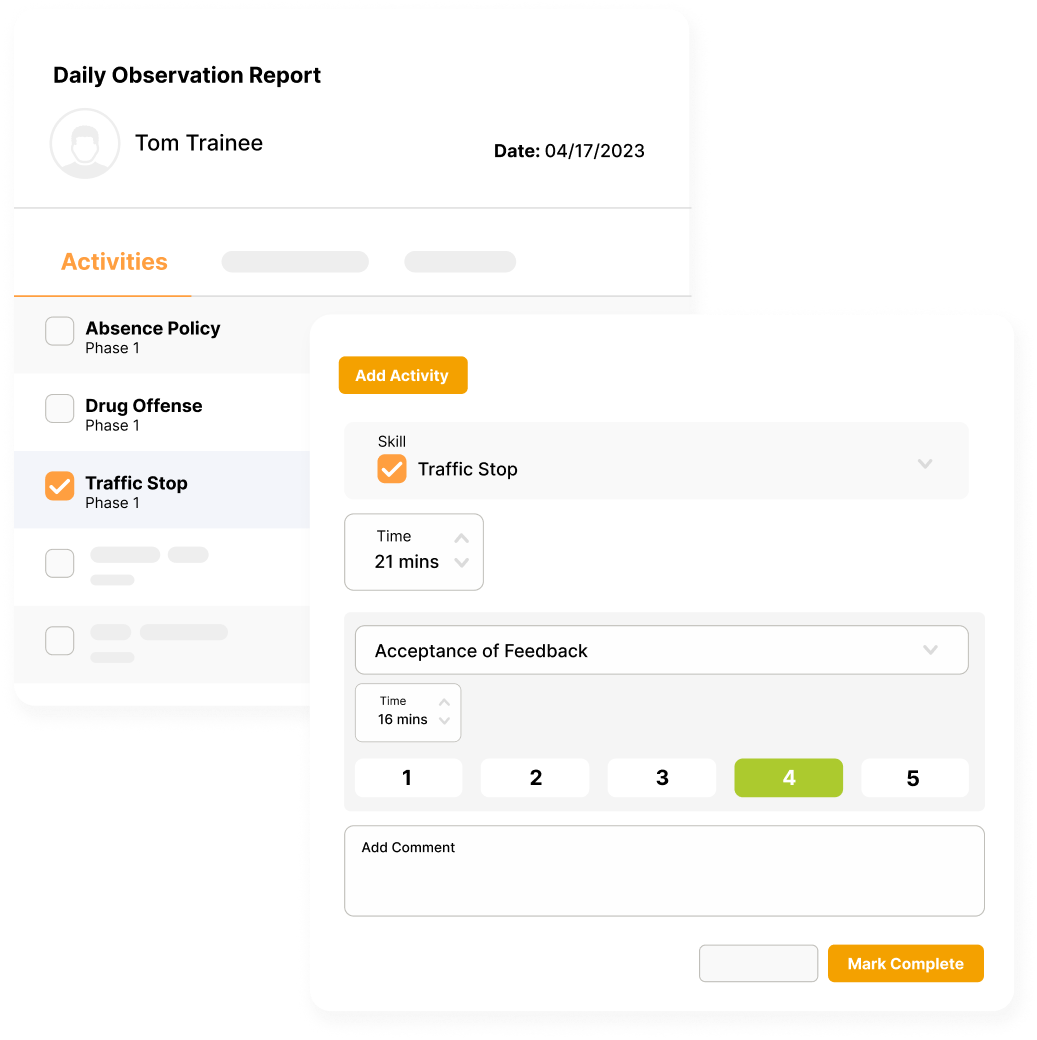
Daily observation report (DOR) example for a traffic stop in PowerReady field training software

Paper Based Field Training Creates Risk

Physical field folders, manual scoring logs, and disconnected spreadsheets make it harder for public safety agencies to document trainee performance consistently.

  • Delayed Training Feedback: Paper binders and scattered notes can slow documentation, leaving trainees without timely coaching or clear performance expectations.
  • Reviewer Recency Bias: Field Training Officers may overemphasize recent shifts when multi-week performance history is hard to recall.
  • Limited Progress Visibility: Disconnected records make it difficult for command staff to identify training gaps, stalled progress, or readiness concerns early.

Move from Paper Logs to Standardized Field Training

icon-strategy-arrows-in
Centralized Observation Forms

Manage DORs, evaluation checklists, and performance categories in one digital training record

icon-business-document-arrows
On the Fly Activity Documentation

Allow trainers to log field interactions, completed activities, notes, and attachments during active shifts.

icon-strategy-press-button
Actionable Insights and Reports

Collect and compare data by phase, year, trainer, trainee, activity type, and more. Don't just document training, enhance it.

Simplifying Field Training Delivery from Patrol Cars to Command Staff

Help your field training officers, probationary trainees, and professional standards division track progress in fewer steps.

  • Configure Custom Program Curriculums: The training coordinator accesses the master setup, establishing specific phases, skills, and activities to map role requirements.
  • Log Performance During Active Shifts: The FTO executes real time grading, recording exact scores, completion metrics, and narrative supervisor comments inside the digital DOR during field operations.
  • Analyze Historical Trajectory Progress: The system evaluates performance metrics continuously, automatically compiling daily inputs into aggregated progress charts to highlight specialized training gaps.
  • Route Completed Dossiers for Final Sign Off: The platform routes the final phase package through an automated chain of-command approval workflow, capturing electronic signatures from trainers, trainees, and executives.
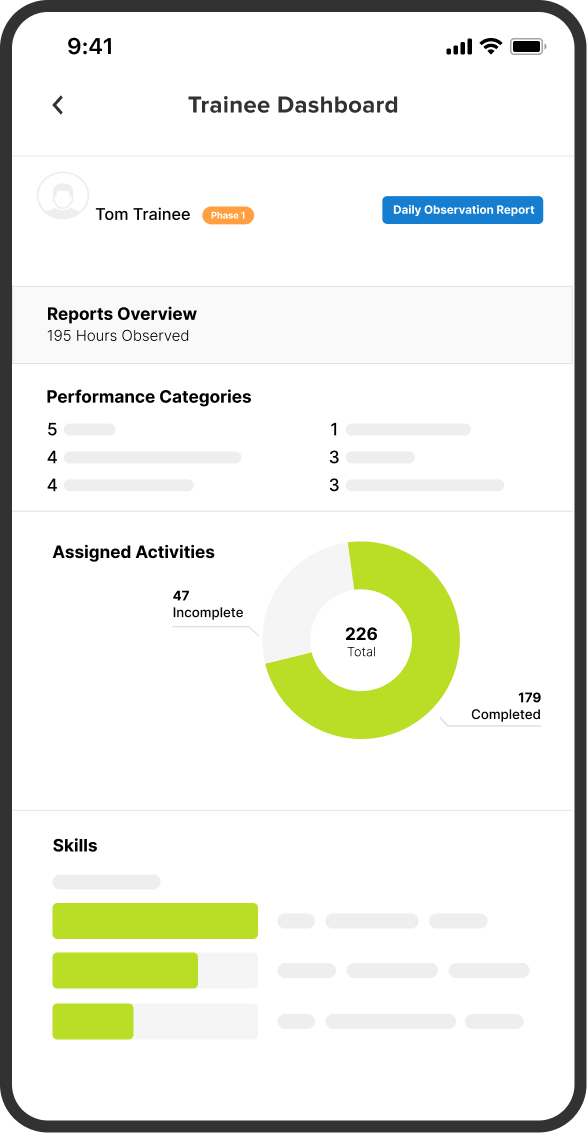
Ready Product Screenshot - Trainee Dashboard - Mobile

Field Training Features Built for Public Safety

DOR Content Builder

Create point or scaled evaluation forms with standardized performance categories.

Activity Logging

Add unlisted field activities, notes, attachments, and supporting documentation directly to active shift records.

CAD Connection

Import CAD numbers, completion dates, and incident call types into a trainee’s active DOR form.

Reports & Dashboards

Analyze and improve your program with reports, real time dashboards and side by side comparisons.

Performance Improvement Plans

Create measurable improvement plans with approval workflows, goals, and remedial activities.

Program Templates

Get started faster with more than 20 program templates built to match your training model.

Internal Alert Triggers

Notify designated users about overdue forms, low ratings, or required follow-up.

Turn Field Training Data Into Operational Readiness

Move beyond paper checklists to improve training consistency, documentation quality, and command level visibility.

  • Audit Readiness and Lower Risk: Maintain digital training records, signatures, timestamps, and performance histories in one secure system.
  • More Consistent Evaluations: Standardize scoring categories and documentation expectations across trainers, shifts, and programs.
  • Earlier Intervention: Identify struggling trainees sooner with progress visibility, alerts, and performance trend summaries.
  • Smarter Command Decisions: Use dashboards and training data to understand readiness, coaching needs, and program effectiveness.
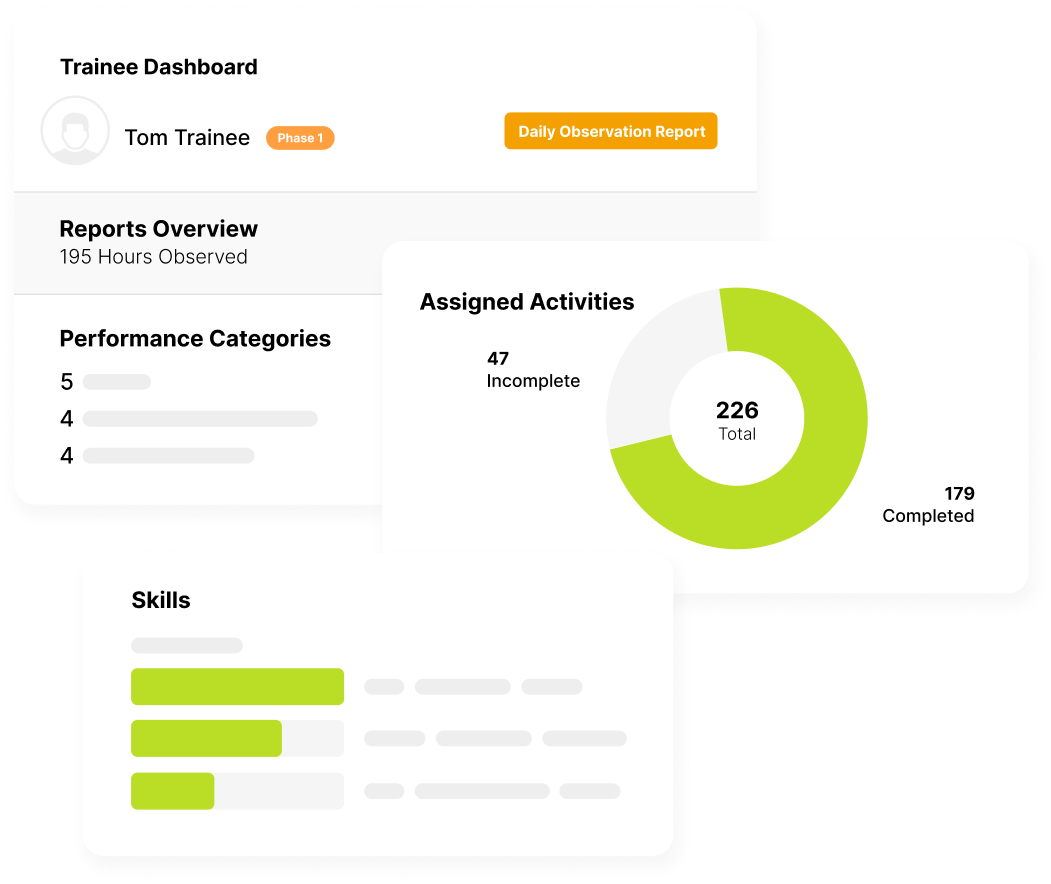
Trainee Dashboard Sections

Paper FTO Programs vs. PowerReady

Traditional FTO Approach
The PowerReady Solution
Paper binders and local files store trainee records Centralized cloud workspace organizes evaluation records
Trainers rely on memory to review past shifts Real time activity logging captures shift level performance
Dispatch details are typed manually into forms CAD connection imports call details into DORs
Checking compliance matrices on disconnected files Integrated dashboards linking policy, recall, and training data
   

Cincinnati ECC

Cincinnati ECC Login Page jpg image

"PowerReady protects us from liability with clear evidence to justify personnel decisions."

Nick Erskine, ECC Training Manager - City of Cincinnati, OH

Yuma Police Department

powerdms-photos-yuma-pd-case-study-1
Using PowerReady, a Yuma PD sergeant can sign off on a week’s worth of DORs for a trainee in as little as 1-2 hours.

Lt. Conley - Yuma Police Department

Durham County EMS

powerdms-assets-photos-633-durham-nc
"PowerReady helps us protect our trainees, our organization, and the public."

Sara Houston, EMS-FTEP Coordinator - County of Durham, NC

Connect Field Training to Your Public Safety Ecosystem

PowerReady works with related PowerDMS solutions to connect training records, policy knowledge, and accreditation support.

  • PowerPolicy: Link relevant policies, general orders, and tactical manuals inside training evaluation fields.
  • PowerRecall: View policy reinforcement and microlearning results alongside trainee progress.
  • PowerStandards: Use completed observation forms and sign offs to support accreditation documentation.
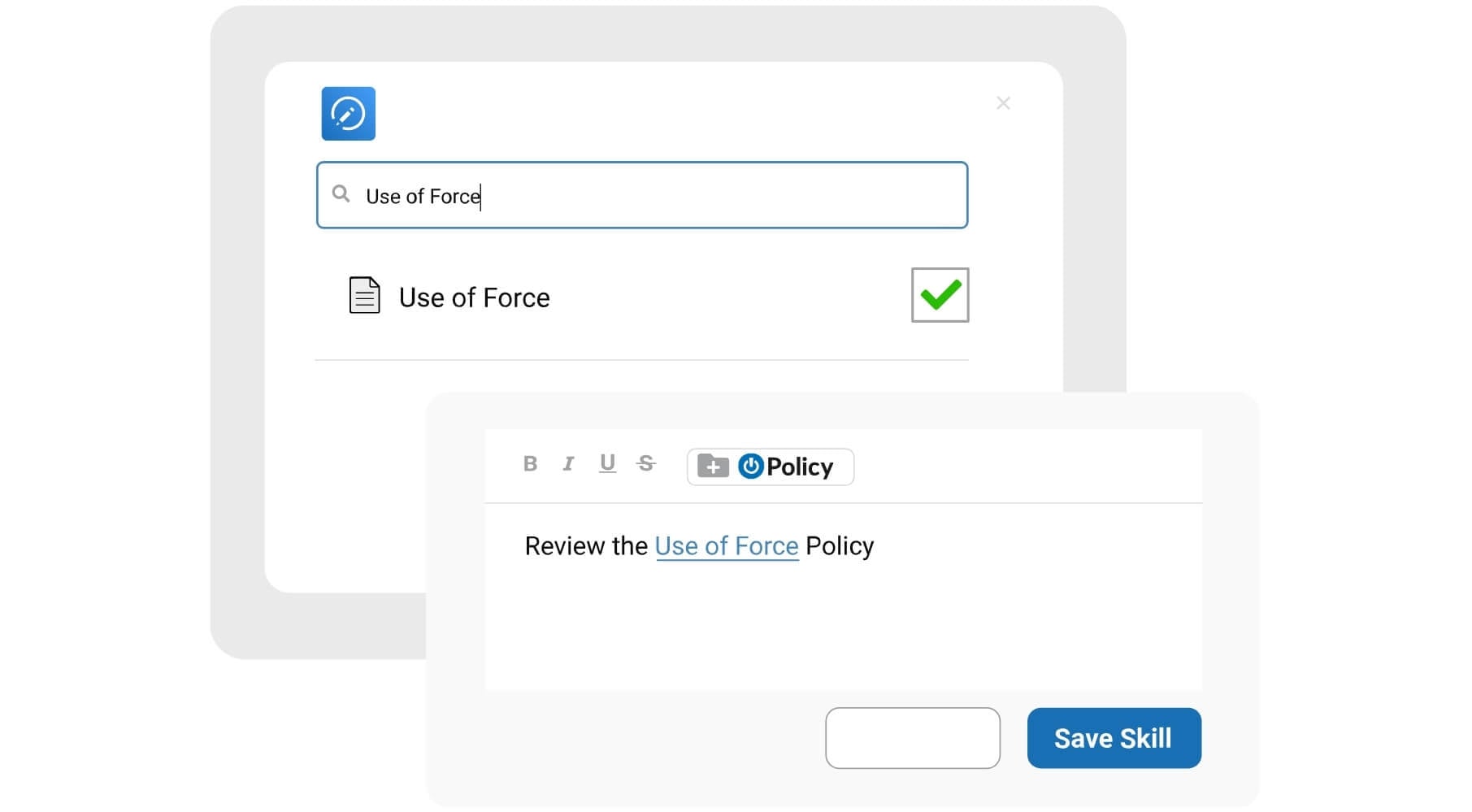
ready-policy

Protect Sensitive Field Training Records

PowerReady helps agencies manage confidential trainee records with secure access controls, audit ready documentation, and cloud based safeguards.

  • Role Based Access Controls: Limit training records, evaluations, and performance documentation to authorized users.
  • Audit Trails: Track key record activity, approvals, edits, and signatures to support accountability and review.
  • Secure Cloud Hosting: Store public safety training data in a cloud environment designed for government security and reliability needs.
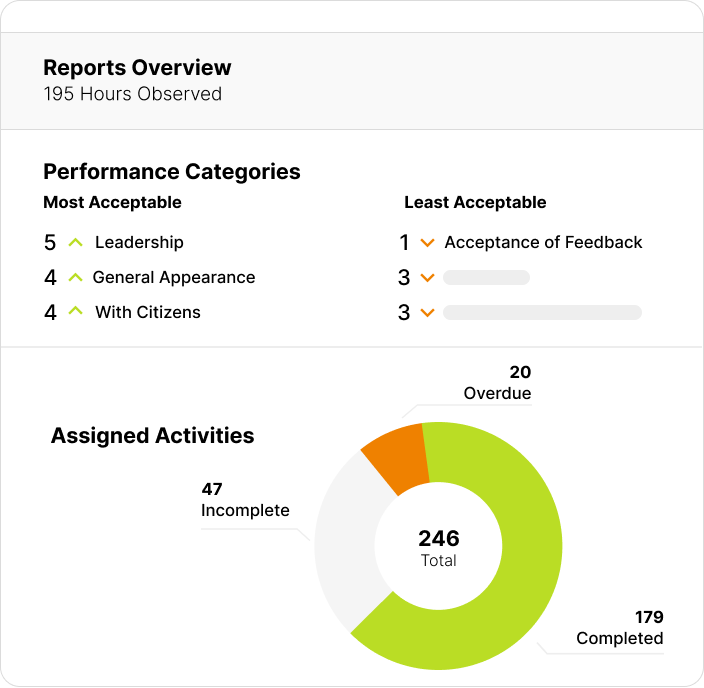
Ready Product Screenshot - Reports Overview

Read more about PowerReady

Top Questions We Get Asked

The module links your dispatch ecosystem directly to the active training workspace under site settings. When an officer logs into their daily observation report form, the system automatically pulls completed dispatch calls—including the exact CAD number, completion date, and incident classification type—eliminating manual data typing.
Chiefs of police, sheriffs, field training coordinators (FTOs), communication training officers (CTOs), corrections academy leads, and public safety human resource directors should utilize PowerReady. It is engineered explicitly for public employers burdened by manual spreadsheet tracking, stalled paper lines, or severe rater recency bias.
PowerReady is built for public safety field training, not general employee learning. It supports Daily Observation Reports, field activity tracking, CAD-connected records, Performance Improvement Plans, policy references, and audit-ready documentation for high-liability training environments.
Out of the box, PowerReady includes complete native internal integration with PowerPolicy, PowerStandards, and PowerRecall, completely eliminating duplicate data entry workloads across your precincts.

Full system configuration is achieved within a structured timeframe managed by dedicated implementation consultants and solutions engineering specialists. This onboarding path guides your division through baseline library architecture configuration, single sign-on setup, and user permission loops prior to live launch.


Yes. PowerReady features a flexible template wizard that allows training leads to create new evaluation programs from scratch, copy existing internal configurations, or borrow pre-built public safety program blueprints (such as the San Jose model templates) to save development time.

The software environment is hosted on secure, highly redundant cloud architecture engineered explicitly to satisfy strict government information security policies and data redundancy rules. The network undergoes continuous independent third-party evaluations to guarantee absolute data protection for confidential personnel histories.

Yes. If a trainee encounters an unusual field scenario or executes an unlisted tactical maneuver, the Field Training Officer can inject a custom activity on the fly directly into the active evaluation form, adding specific comments, tracking time, and updating overall scores seamlessly.

Read more about PowerDMS PowerPolicy

Accelerate Field Training and Strengthen Readiness

Replace paper folders and spreadsheets with digital field training software built for public safety documentation, evaluation, and command visibility.

Equip your training division with a platform for public safety field training.

     Fill out the form to request a demo.