Policy training software to recall information when it matters most
Are you confident your employees know your policies? PowerRecall is designed to reinforce employees' knowledge and recall of policy content, using AI-generated digital flashcards, created from your own job-critical documents in PowerPolicy.
Policy Retention Isn’t Optional. Now It’s Smarter.
Watch how Cincinnati ECC built a culture of readiness with AI-powered reinforcement through tech-powered policy training, and why that matters when lives are on the line.
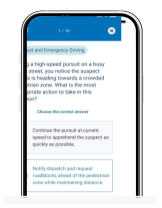
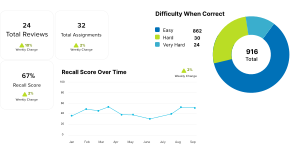
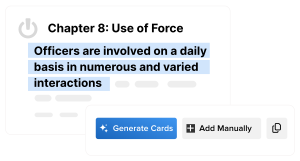
Hey, everyone. Welcome to this product demo on Recall, our latest software designed to help your team remember your most important policy content when it really counts. My name is Abhishek Murali, and I'm excited to show you how Recall can take your policy training to the next level by making it more automated and effective. Let's dive in. Making sure employees sign off on policies and testing their understanding right after they review them is super important for staying compliant. But here is the thing, just because they get it right away doesn't mean they'll remember this information weeks or even months down the line. And let's face it, with constant policy updates and a ton of new information for employees to remember, it's a real challenge to keep up and perform at your best. This gets even tougher when employees need to recall detailed policies and training during high stress situations when every second counts. This is precisely where Recall steps in. Recall uses augmented intelligence to transform your existing policy documents into interactive training tools. It also provides real time data on employee recall. This ensures that your team is not only compliant, but also able to remember and apply information when it really matters. Now let's dive into how recall actually works. First, through the use of augmented intelligence, you can quickly generate digital flashcards from your existing documents. It doesn't create any artificial information, instead it links these training cards directly to specific sections within your policy. Next, recall uses a science backed learning method called spaced repetition. Basically, the more often employees are quizzed on key policy items, the more likely they are to remember that information when it really matters. This method not only boosts their information retention, but also ensures that critical knowledge can be easily recalled when high stakes situations arise, especially where every second counts. Additionally, recall offers valuable data and insights on general policy comprehension. You'll be able to track improvements over time, spot any training gaps, and get actionable feedback on how to fine tune your existing processes. With Recall, you'll have everything you need to ensure your team is always on top of critical policy information across changes and revisions. Let's take a quick look at some of the best features of Power recall. Let's start by pulling in an existing policy document into PowerRecall. You can do this at any time by clicking on the New Card button on any deck. Once you have selected the document, you can choose to highlight a specific section of this document or scan the entire document to auto generate digital flash cards. Click the Generate button to run the operation. And as you can see, new flash cards are being generated, each packed with key points and questions to reinforce understanding and retention. Administrators have full control to review and customize these flashcards to meet your specific needs. You can edit questions, add new responses, or adjust settings about the question to tailor the learning experience. This ensures that the training material is always relevant and up to date. Administrators are also notified when new policy revisions are available so that updates to the cards can be made really quickly. Next, let's take a quick look at assignments. Once the flashcards have been created and published, you can easily navigate to the Assignments section and select any existing user or group to get assigned to cards from this deck. You can easily track who has completed their training and who might need a reminder. This feature ensures that everyone stays current with the latest policies and updates. Team members, on the other hand, receive inbox notifications on both web and mobile devices to make it easy to review fresh cards at their convenience. This flexibility helps seamlessly integrate learning into their daily routines. As employees review their tasks and go through the different questions, they're immediately notified if they've gotten a question right or wrong. For correct answers, the algorithm will space out the card for review at a later date. However, for incorrect answers, the cards are immediately reassigned until they're answered correctly. This interactive training approach boosts engagement and retention as they learn what's working and what's not and ultimately making learning a lot more fun and effective. While they're reviewing these questions, they can look up policy information right at the end of answering the question and then hone in on the specific paragraph where the question came from. And ultimately, this learning experience can be a lot more fun and effective as it focuses on retention versus testing. And then lastly, recall analytics provides key insights into performance through a new metric called recall score. Recall score offer visibility into the overall comprehension of your policy. You can break this down by deck, by user, by group, or by document. Recall administrators can monitor the improvement of this score over time and schedule reports via email to other department leaders. To wrap up, here is why Recall is a game changer. You can reduce your liability and risk with proof of policy comprehension, simplify learning and policy recall like never before, enhance safety by ensuring your employees can remember your most important policy information when it really matters, when every second counts. Thank you so much for taking the time to explore recall with me today. We're excited to show you how recall can elevate your operations to the next level. Please get in touch.
Smarter Policy Retention Starts Here
Watch this short overview to see how PowerRecall works, how it’s built from your existing policies, and how it helps employees retain critical information over time through science-backed policy training.
Built on PowerPolicy, the software creates flashcards from your existing policies and critical documents.
Augmented Intelligence
AI-powered card generation saves you time – only creating cards from your own content.
Training Decks
Flashcards are grouped into decks to train employees on a policy, or on a topic covering multiple policies.
Mobile Accessibility
Policy training cards can be completed from any device using the same mobile app as PowerPolicy.
Comprehensive Reporting
Detailed reports on user progress, compliance, and training outcomes, able to fit specific admin needs.
Analytics Dashboard
User engagement, performance, and training effectiveness is tracked for content, users, and groups.
Secure use of AI
Trust and privacy are at the core of our mission. We use a secure enterprise AI solution that strictly enforces data isolation. That means your data is never shared or used to train AI models in any way.
PowerRecall uses AI to create high-quality digital flashcards from your own content – saving you time while keeping your information safe.
PowerRecall is policy training software that leverages microlearning to provide short training sessions that can be completed in a few minutes. It uses the power of AI to quickly generate digital flashcards from your existing policies and mission critical documents inside PowerPolicy.
Recall is a tool to help you expedite creation of training content, identify knowledge gaps, and to supplement your training efforts using the latest technology. While it doesn’t replace your existing training efforts, it offers you an additional way to provide ongoing training to your employees in just minutes a day, ensuring the material stays fresh.
Documents scanned with AI are not used to train AI models at PowerDMS by NEOGOV. We treat data integrity seriously and ensure that information from policies cannot be accessed outside the rules the agency sets up within Recall. Administrators have full control over which documents are scanned with AI.
PowerRecall only takes minutes a day. Employees have a seamless experience with Recall as the assignments are shown in their PowerPolicy inbox and task list. Most employees are able to complete assignments in a few moments of downtime without having to schedule classroom training. They can also complete them on the mobile app.
It depends on your internal review processes. Once you have your documents inside PowerPolicy, content can be created and assigned to your employees as quickly as just a few minutes.
Recall helps organizations improve retention and real-world application of critical policies for high-liability scenarios like use of force and pursuits for law enforcement. Common uses include jail policy training, emergency communications and healthcare protocols, and targeted learning for promotions, new roles, and performance improvement, helping employees close knowledge gaps and respond with confidence.
No, Recall works seamlessly inside PowerPolicy so that you can use your existing content and mobile app for the best user experience.
Recall end users will only see cards in their inbox that have been assigned to them to complete. Administrators can have view rights to see decks, audit rights to see and run reports on decks, or edit rights to collaborate and create decks. PowerPolicy master admins will be able to edit all decks and cards.
Yes. Decks or cards can be “boosted” to ensure they are reviewed ahead of other assigned material. The boost remains active until assignments are reviewed or until manually terminated.
This feature is not yet available but is being reviewed as a potential enhancement.
Employees receive a dedicated scoreboard at the end of each training session with performance results, have access to a personal dashboard showing their progress, and receive a weekly summary email. Many have reported that taking their Recall cards feels like playing a game.
Recall Leaderboards are available to administrators only. Administrators can use the dashboards and reports to see leaderboards by individual employees or by groups. Your internal policy will determine how that information is shared.
Accreditation readiness shouldn't start six months before your onsite. Here's how to build compliance into daily operations so your agency is always compliant.
Discover how AI in law enforcement helps agencies close compliance gaps, support officer wellness, improve training, and build and maintain community trust.
Comparing public safety software platforms? See how PowerDMS by NEOGOV, Vector Solutions, Lexipol, and Command HQ compare on policy, training, and compliance.