Police scheduling can be especially challenging for small departments that need to maintain 24/7 coverage with limited staff. Choosing the right police schedule is critical for balancing officer workload, reducing fatigue, and ensuring consistent public safety coverage. If your department has 35–50 officers and is struggling to find an efficient rotation, these proven police schedule examples can help you improve staffing, streamline operations, and better support your team.
Different sized departments require different scheduling rotations. If you have about 35-50 officers in your patrol division, and are struggling with schedules, these examples might be worth a try.
Selecting the right rotation can significantly impact officer morale, overtime costs, and operational efficiency. Small departments in particular need schedules that maximize coverage without overextending limited personnel.
The Pitman schedule was used the most, by far, in departments of approx. 35 person departments. However, since we cover this schedule in detail in another post, we will not show it on here. To view an example of this rotation, please click here.
The next most popular police schedules for small departments were:
- [4 on 3 off] [3 on 4 off] and [3 on 3 off] [4 on 4 off]
- [4 on 3 off]
- [4 on 2 off]
1. [4 on 3 off] [3 on 4 off] and [3 on 3 off] [4 on 4 off]
12-hour shifts, 2 weeks, 2 templates
This rotation is pretty straight forward.
This schedule is particularly useful for departments that want longer shifts paired with more consecutive days off. It can also help reduce scheduling conflicts by creating a predictable, repeating pattern for officers.
If your department is willing to work 12-hour shifts, this is a pretty good option because of the amount of days off and every other weekend getting at least the Saturday off. However, longer shifts may increase fatigue if not managed carefully, especially during high-demand periods. Departments should monitor workload and ensure adequate rest between shifts to maintain officer performance and safety.
For 24x7 coverage you simply use the two day squad templates below and add 2 more of the same ones but on graveyard shift. This approach ensures continuous coverage while keeping scheduling relatively simple to manage. It also allows departments to scale staffing by adjusting the number of squads assigned to each shift.
![[4 on 3 off] [3 on 4 off] and [3 on 3 off] [4 on 4 off] template 1](https://www.powerdms.com/hs-fs/hubfs/Imported_Blog_Media/43343344_1.webp?width=971&height=524&name=43343344_1.webp)
![[4 on 3 off] [3 on 4 off] and [3 on 3 off] [4 on 4 off] template 2](https://www.powerdms.com/hs-fs/hubfs/Imported_Blog_Media/43343344_2.webp?width=970&height=525&name=43343344_2.webp)
2. [4 on 3 off]
10-hour shifts, 1 week, 7 templates
Below you will see 7 templates. However, you do not need to use all 7.
This schedule offers more flexibility than 12-hour rotations while still providing extended time off. It can be a good middle ground for departments that want to reduce fatigue while maintaining strong coverage.
The important thing is that you use enough of these to cover all days and copy the templates with a mid and night shift as well.
These use 10-hour shifts, therefore requiring a day, mid, and night shift.
Adding mid-shifts can help cover peak demand periods and reduce strain on day and night shifts. This structure also allows for better distribution of workload throughout the day.
![[4 on 3 off] template 1](https://www.powerdms.com/hs-fs/hubfs/Imported_Blog_Media/4%20on%203%20off_1.png?width=972&height=311&name=4%20on%203%20off_1.png)
![[4 on 3 off] template 2](https://www.powerdms.com/hs-fs/hubfs/Imported_Blog_Media/4%20on%203%20off_2.png?width=971&height=311&name=4%20on%203%20off_2.png)
![[4 on 3 off] template 3](https://www.powerdms.com/hs-fs/hubfs/Imported_Blog_Media/4%20on%203%20off_3.png?width=972&height=310&name=4%20on%203%20off_3.png)
![[4 on 3 off] template 4](https://www.powerdms.com/hs-fs/hubfs/Imported_Blog_Media/4%20on%203%20off_4.png?width=970&height=312&name=4%20on%203%20off_4.png)
![[4 on 3 off] template 5](https://www.powerdms.com/hs-fs/hubfs/Imported_Blog_Media/4%20on%203%20off_5.png?width=972&height=311&name=4%20on%203%20off_5.png)
![[4 on 3 off] template 6](https://www.powerdms.com/hs-fs/hubfs/Imported_Blog_Media/4%20on%203%20off_6.png?width=971&height=313&name=4%20on%203%20off_6.png)
![[4 on 3 off] template 7](https://www.powerdms.com/hs-fs/hubfs/Imported_Blog_Media/4%20on%203%20off_7-1.png?width=971&height=310&name=4%20on%203%20off_7-1.png)
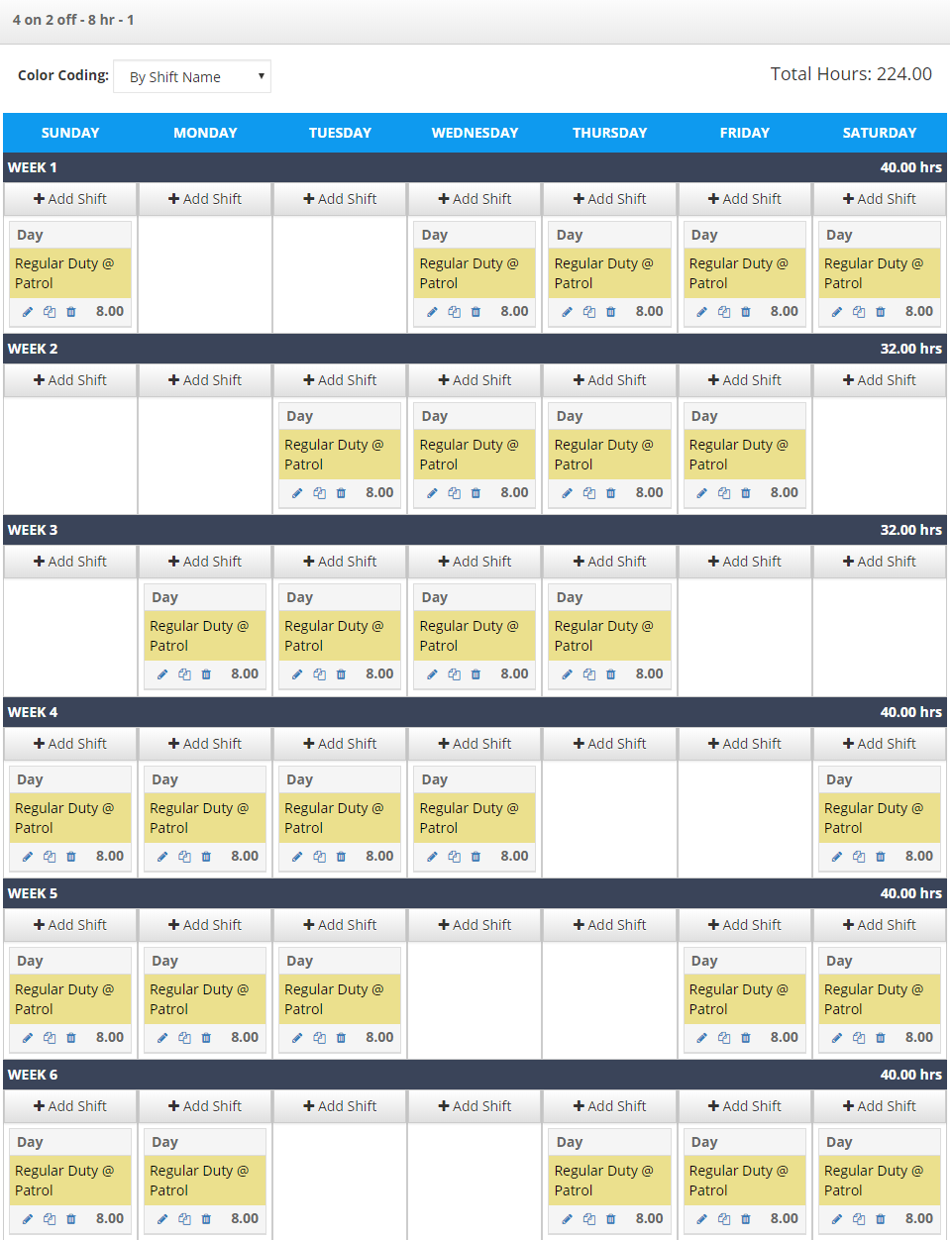
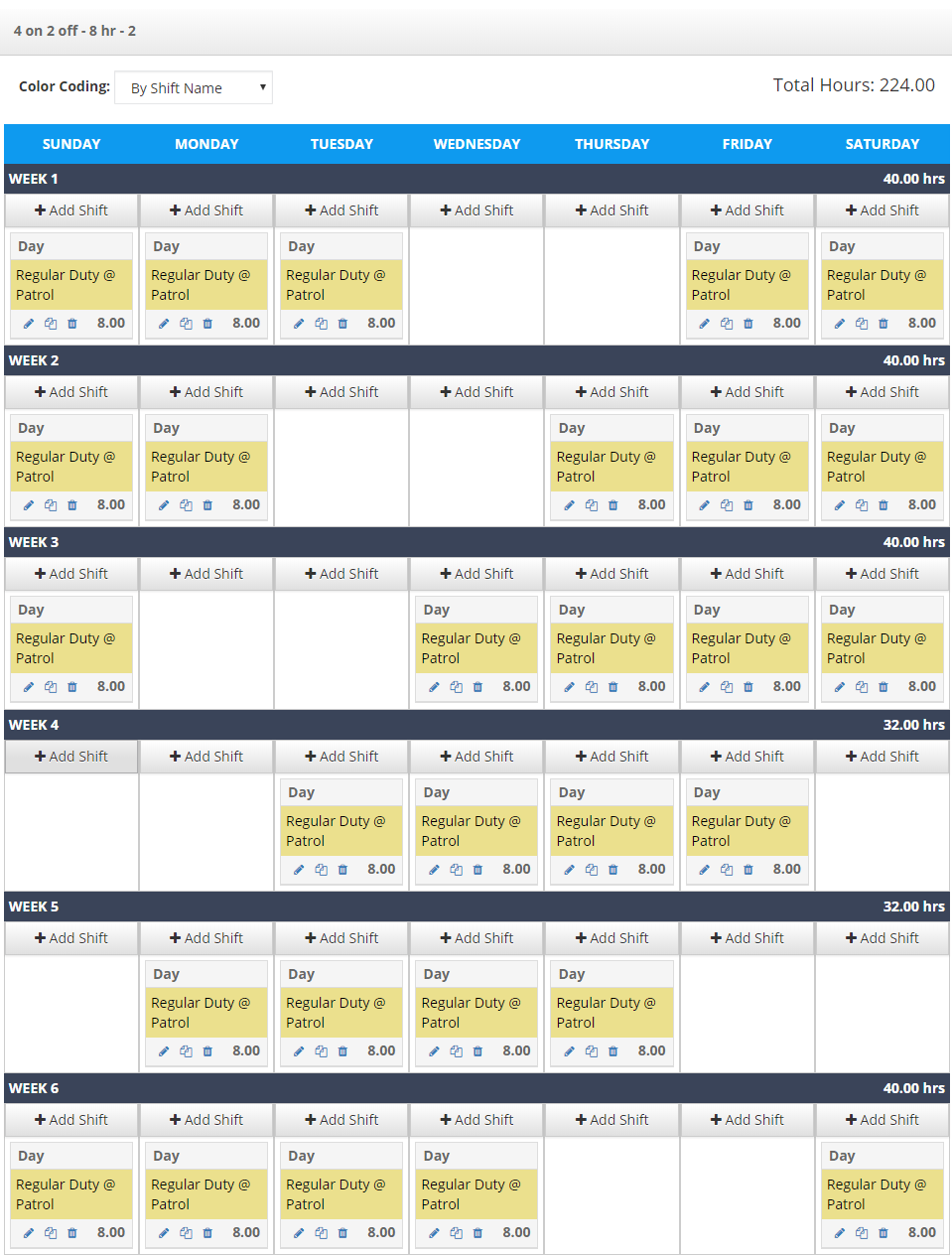
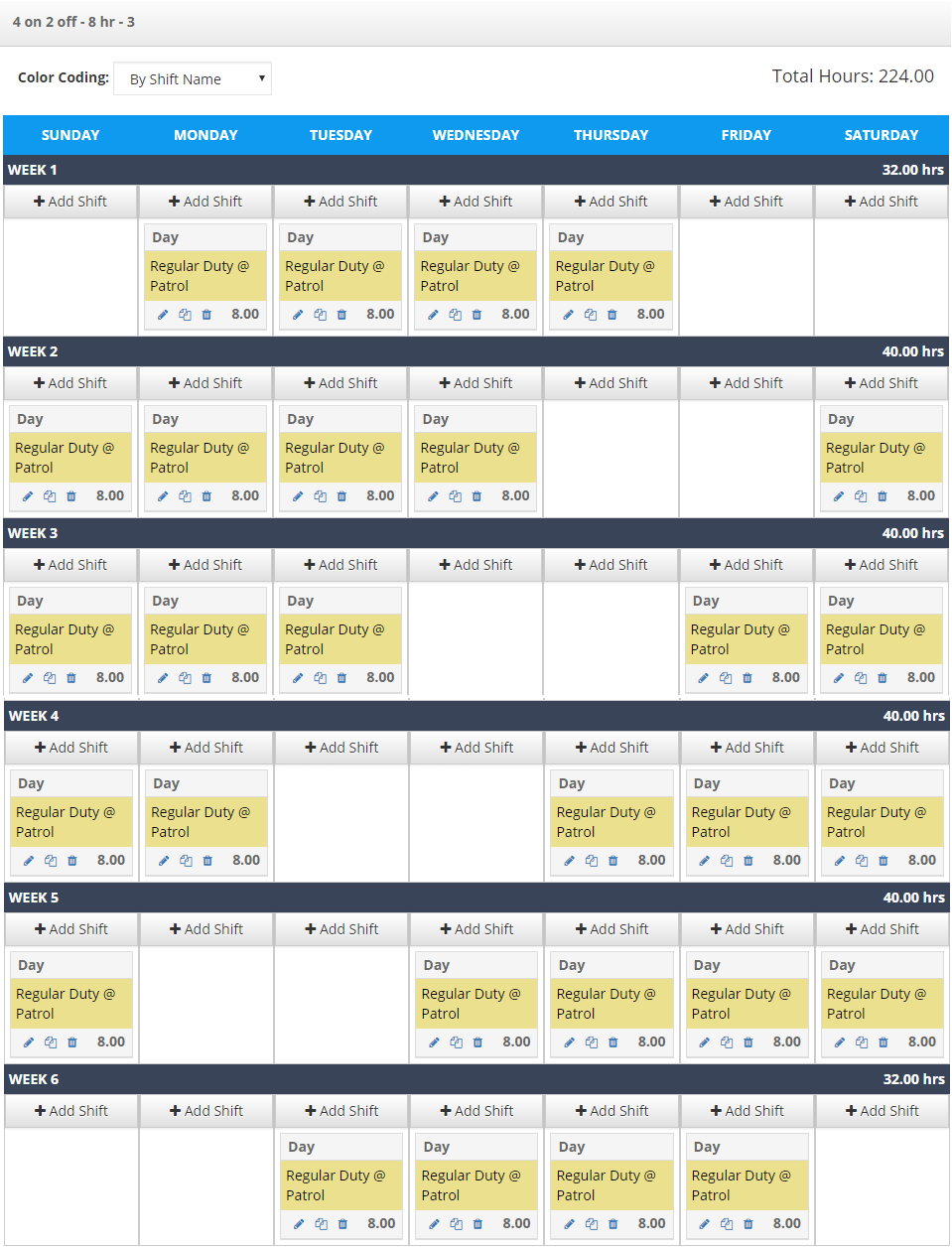
3. [4 on 2 off]
8-hour shifts, 6 weeks, 3 templates
Some weeks the employee will only be scheduled 32 hours but averages 37 hours a week over the course of the 6 weeks.
This schedule closely resembles traditional workweeks, which can make it easier for officers to adjust. It also provides more frequent shift changes, which some departments prefer for fairness and rotation.
To cover 24x7 you will need to create 6 more templates:
- 3 for mid shift
- 3 for night shift
While this structure requires more templates, it offers consistent daily coverage across all shifts. It can also simplify scheduling for departments that prefer standard 8-hour workdays. While this rotation is also longer, its simplicity makes it easy for both supervisors and officers to understand and follow. This can reduce scheduling errors and improve overall efficiency.
Want to take these police scheduling examples with you?
Creating a new schedule can be stressful. Taking the time to evaluate different scheduling models can lead to long-term improvements in efficiency and morale. Having a clear, documented schedule also helps ensure consistency across shifts and teams.
Save and/or print this page to assist with your scheduling changes.
Scheduling software can automate complex rotations, reduce administrative workload, and improve visibility into staffing needs. It can also help departments adapt quickly to changes in staffing or demand. To learn more about scheduling software to handle these variable shifts, fill out the form below!